Fixing the Unskippable Firefox SEC_ERROR_BAD_SIGNATURE for the Nextcloud AIO Interface
Since Nextcloud All-in-One (AIO) switched its mastercontainer to Caddy, I could no longer open the Nextcloud AIO admin interface in Firefox. The underlying issue is a name collision between the internal Caddy CA used by Nextcloud AIO and the internal Caddy CA used by my own reverse proxy. This post documents the solution I chose.
Back to the beginning. After opening:
https://<server-ip>:8080
Firefox failed with:
SEC_ERROR_BAD_SIGNATURE
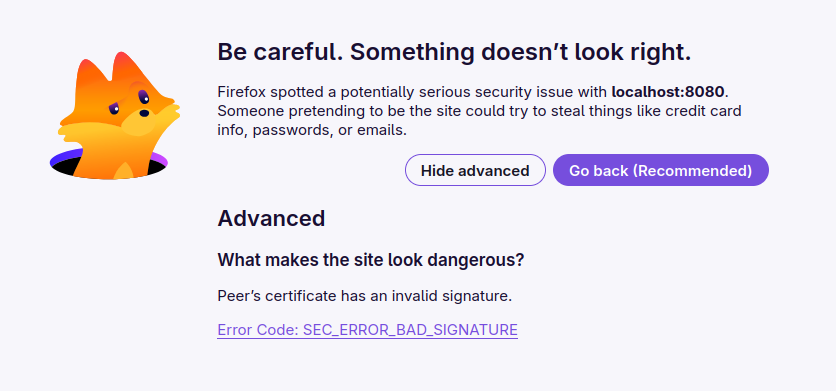
Unlike the usual self-signed-certificate warning, Firefox did not offer an Accept the Risk and Continue button. Chromium could bypass the error, but that was not a real solution. The underlying issue is a name collision between the internal Caddy CA used by Nextcloud AIO and the internal Caddy CA used by my own reverse proxy.
My solution: Replacing AIO's embedded Caddy CA with the root CA already used and trusted by my existing Caddy instance, which avoids needing to import another root certificate into Firefox or accepting a browser warning.
The background and upstream discussion are documented in Nextcloud AIO discussion #7937.
Why the error occurs
Newer Nextcloud AIO versions use Caddy inside the nextcloud-aio-mastercontainer to serve the admin interface on port 8080. When accessed via the server's IP address or internal domain name, Caddy issues a certificate from its own internal CA.
Caddy's default internal CA uses these names:
Caddy Local Authority - <year> ECC Root
Caddy Local Authority - ECC Intermediate
If you also operate your own Caddy reverse proxy with tls internal, it typically creates a CA with exactly the same names, but with different cryptographic keys.
The error only appears if you have imported the root certificate of your own Caddy instance into Firefox, which is the normal thing to do so that your internal sites load without warnings. Firefox then attempts to validate AIO's intermediate certificate against the trusted root with the same issuer name: the root of your own Caddy instance. Because the keys do not match, signature validation fails. Firefox reports SEC_ERROR_BAD_SIGNATURE, which cannot be overridden.
The approach
Instead of changing the CA name of my existing Caddy installation, I made Nextcloud AIO use the CA that my Firefox already trusts.
The steps are:
- Back up AIO's existing internal Caddy CA.
- Back up AIO's existing leaf certificates.
- Copy the existing Caddy root and intermediate certificate/key pair into AIO's Caddy PKI directory.
- Remove AIO's cached leaf certificates.
- Restart AIO.
- Caddy issues a new leaf certificate for the AIO interface, signed by the existing trusted CA.
All steps can be done while the mastercontainer is running; the restart at the end makes Caddy pick up the new CA.
This does not modify Nextcloud data, the Nextcloud containers, or the main AIO configuration. It only affects the internal Caddy PKI used by the mastercontainer interface.
A word on security: this puts the private key of your existing root CA in a second place. The AIO mastercontainer already has access to the Docker socket, so anyone who compromises it effectively controls the host anyway, but you should be aware of it.
Paths involved
Inside the AIO mastercontainer, the relevant paths are:
/mnt/docker-aio-config/caddy-internal/pki/authorities/local
/mnt/docker-aio-config/caddy-internal/certificates/local/<local.name>
The pki subdirectory contains:
root.crt
root.key
intermediate.crt
intermediate.key
The second path holds the leaf certificates. <local.name> is usually the IP address or local host name through which you access the AIO interface, for example:
192.168.1.10
1. Back up AIO's internal CA
Create a backup directory on the Docker host:
mkdir -p aio-caddy-ca-backup
Copy AIO's current internal CA out of the container:
docker cp \
  nextcloud-aio-mastercontainer:/mnt/docker-aio-config/caddy-internal/pki/authorities/local \
  ./aio-caddy-ca-backup/
The backup will be available at:
./aio-caddy-ca-backup/local/
2. Back up AIO's existing leaf certificates
Create another backup directory:
mkdir -p aio-caddy-leaf-backup
Copy all existing leaf certificates:
docker cp \
  nextcloud-aio-mastercontainer:/mnt/docker-aio-config/caddy-internal/certificates/local \
  ./aio-caddy-leaf-backup/
3. Replace AIO's CA with your existing Caddy CA
Set the path to the directory containing your existing Caddy CA files:
MY_CADDY_CA_DIR="/path/to/your-caddy-ca"
If you run the official Caddy Docker image, this is /data/caddy/pki/authorities/local inside the container, i.e. below wherever you mounted /data on the host.
That directory must contain these PEM-encoded files:
root.crt
root.key
intermediate.crt
intermediate.key
Copy them into the AIO mastercontainer:
docker cp "${MY_CADDY_CA_DIR}/root.crt" \
  nextcloud-aio-mastercontainer:/mnt/docker-aio-config/caddy-internal/pki/authorities/local/root.crt

docker cp "${MY_CADDY_CA_DIR}/root.key" \
  nextcloud-aio-mastercontainer:/mnt/docker-aio-config/caddy-internal/pki/authorities/local/root.key

docker cp "${MY_CADDY_CA_DIR}/intermediate.crt" \
  nextcloud-aio-mastercontainer:/mnt/docker-aio-config/caddy-internal/pki/authorities/local/intermediate.crt

docker cp "${MY_CADDY_CA_DIR}/intermediate.key" \
  nextcloud-aio-mastercontainer:/mnt/docker-aio-config/caddy-internal/pki/authorities/local/intermediate.key
Why root.key is needed too: Caddy's internal intermediate certificate is short-lived and Caddy renews it automatically, which requires the root key. Over time, AIO's Caddy and your own Caddy will each renew their own intermediate, so the two intermediates will drift apart. That is fine: both are signed by the same trusted root, and that is all Firefox checks.
4. Remove AIO's old leaf certificates
This step is important. Otherwise, Caddy may continue serving a cached leaf certificate that was signed by the old AIO CA.
Remove all cached leaf certificates:
docker exec nextcloud-aio-mastercontainer \
  sh -c 'rm -rf /mnt/docker-aio-config/caddy-internal/certificates/local/*'
If you prefer to remove only the certificate for the AIO interface (replace <local.name> with your actual name):
docker exec nextcloud-aio-mastercontainer \
  sh -c "rm -rf /mnt/docker-aio-config/caddy-internal/certificates/local/<local.name>"
5. Restart AIO
docker restart nextcloud-aio-mastercontainer
Follow the startup logs:
docker logs -f nextcloud-aio-mastercontainer
On startup, Caddy loads the replacement root and intermediate CA and generates a new leaf certificate for the AIO interface hostname or IP address.
6. Test in Firefox
Open the Nextcloud AIO mastercontainer web interface:
https://<server-ip>:8080
Firefox should now load the AIO interface without SEC_ERROR_BAD_SIGNATURE and without requiring a certificate exception.
To double-check, click the padlock in the address bar and open the certificate details. The certificate chain should end in the same root certificate that you imported into Firefox for your own Caddy instance.
Rollback
If something goes wrong:
- Restore the original CA backup:
bash
   docker cp ./aio-caddy-ca-backup/local/. \
     nextcloud-aio-mastercontainer:/mnt/docker-aio-config/caddy-internal/pki/authorities/local/
- Remove the leaf certificates again:
bash
   docker exec nextcloud-aio-mastercontainer \
     sh -c 'rm -rf /mnt/docker-aio-config/caddy-internal/certificates/local/*'
- Restart the mastercontainer:
bash
   docker restart nextcloud-aio-mastercontainer
Alternative upstream fix
Another fix is for Nextcloud AIO to give its embedded Caddy CA a unique name, for example:
pki {
    ca local {
        name "Nextcloud AIO"
    }
}
That prevents the collision with a separately operated Caddy instance. This change was proposed in the upstream discussion and released with Nextcloud AIO v15.0.0 Beta.
However, existing installations keep their current CA unless its PKI data is deleted and regenerated. Simply upgrading AIO does not fix the error for an installation that already has a CA. For the same reason, the workaround in this post survives AIO upgrades: Caddy keeps using the CA files it finds.
My approach instead reuses an already trusted CA, which avoids needing to import another root certificate into Firefox or accepting a browser warning.